







 परिचय
परिचय
The easiest way to start with SecretCryptos से शुरू करने का सबसे आसान तरीका अपने OS के लिए डेस्कटॉप पैकेज को डाउनलोड करना, सत्यापित करना और इंस्टॉल करना है (Windows, macOS, याLinux)। प्रामाणिकता और सुरक्षा सुनिश्चित करने के लिए हमारी टीम द्वारा सभी रिलीज़ों की सावधानीपूर्वक समीक्षा की जाती है और डिजिटल हस्ताक्षर किए जाते हैं। अधिकांश उपयोगकर्ताओं के लिए, आधिकारिक हस्ताक्षरित संस्करण डाउनलोड करना आरंभ करने का सबसे तेज़ और सुरक्षित तरीका है।
एक बार इंस्टॉल हो जाने पर,SecretCryptosआपको हमारे तक सीधी पहुंच प्रदान करता हैक्रिप्टो मिक्सरऔरइंस्टेंट एक्सचेंजसेवाएं, सभी एक गोपनीयता-केंद्रित डेस्कटॉप ऐप में।
इसके साथ, आप यह कर सकते हैं:
- मिक्स ओवर16+ लोकप्रिय क्रिप्टोकरेंसीमजबूत गोपनीयता सुरक्षा के साथ।
- स्वैप तुरंत सिक्केएकाधिक नेटवर्क परसाथलाइव मूल्य अपडेट.
- अपनीमिश्रण प्रगतिऔर वास्तविक समय में हाल के लेनदेन देखें।
- एक सुरक्षित, एन्क्रिप्टेड कनेक्शन के माध्यम से मिश्रण और विनिमय दोनों का उपयोग करेंगोपनीयता मोडऔरटोर नेटवर्कसमर्थन।
- Enjoy a smooth, user-friendly interface for Windows, macOS, औरLinux.
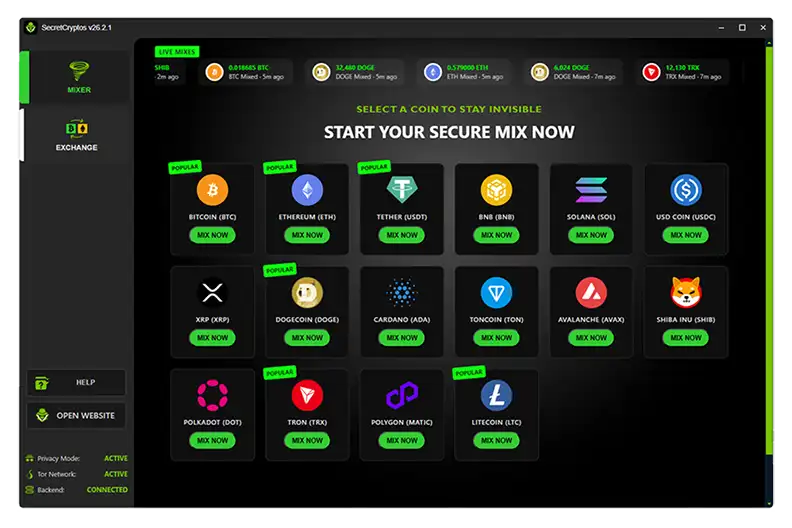
 SecretCryptos इंस्टॉल करें के लिए एक सहज, उपयोगकर्ता-अनुकूल इंटरफ़ेस का आनंद लें। चरण‑दर‑चरण
- इस पृष्ठ से अपने ऑपरेटिंग सिस्टम के लिए पैकेज डाउनलोड करें।
- (अनुशंसित) डाउनलोड की गई फ़ाइल के PGP हस्ताक्षर सत्यापित करें।
- अपने OS पर किसी भी अन्य एप्लिकेशन की तरह SecretCryptos इंस्टॉल करें।
 Windows

- डाउनलोड करें नवीनतम
.msiइंस्टॉलर और उससे मेल खाने वाली.ascहस्ताक्षर फ़ाइल। - हस्ताक्षर सत्यापित करें (वैकल्पिक PGP सत्यापन) यह सुनिश्चित करने के लिए कि इंस्टॉलर के साथ छेड़छाड़ नहीं की गई है।
- इंस्टॉलर शुरू करने के लिए
.msiफ़ाइल पर डबल-क्लिक करें। - If SmartScreen warns you, clickMore info → Run anyway. This warning is normal for unsigned executables.
Default install path (per-user):C:\Users\YourUsername\AppData\Local\Programs\SecretCryptos\
If installed for all users (per-machine):C:\Program Files\SecretCryptos\.
A Start Menu shortcut and a Desktop icon will be created automatically.
 Debian / Ubuntu

- Download the
.debpackage and its matching.ascsignature file. - Verify the signature (Optional PGP Verification) to confirm authenticity.
- Install via GUI (double-click) or using the command line:
sudo dpkg -i SecretCryptos-26.2.1-amd64.deb
sudo apt -f install
 Other Linux

- Download the
.tar.gzarchive and its matching.ascsignature file. - Verify the signature (वैकल्पिक पीजीपी सत्यापन) यह सुनिश्चित करने के लिए कि संग्रह में कोई छेड़छाड़ नहीं है।
- एप्लिकेशन निकालें और चलाएं:
tar -xzf SecretCryptos-26.2.1.tar.gz
cd SecretCryptos-26.2.1
./SecretCryptos
 macOS
macOS
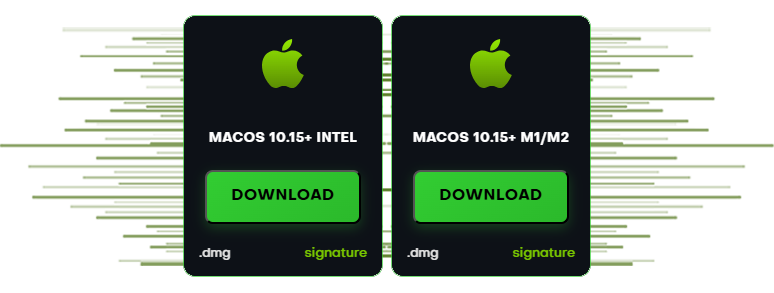
- अपने CPU आर्किटेक्चर (इंटेल या Apple सिलिकॉन M1/M2) के लिए सही
.dmgडाउनलोड करें, साथ ही इसके मिलान वाले.ascहस्ताक्षर फ़ाइल। - इंस्टॉल करने से पहले हस्ताक्षर सत्यापित करें (वैकल्पिक PGP सत्यापन)।
- Open the
.dmgफ़ाइल खोलें औरSecretCryptosमें खींचें आपकाएप्लिकेशनफ़ोल्डर। - पहले लॉन्च पर, यदि गेटकीपर आपको चेतावनी देता है, तोसिस्टम सेटिंग्स → गोपनीयता और सुरक्षा पर जाएं और फिर भी खोलें पर क्लिक करें.
 Optional PGP Verification
All release files are signed with our RSA‑2048 PGP key. Verify signatures to ensure authenticity and integrity.
1) Import the public key
CLI (Windows / macOS / Linux)
gpg --import SecretCryptos_RSA2048.asc
gpg --fingerprint "SecretCryptos"
The fingerprint output must beCCF7 09FD 0DCB 94AF 1D10 7070 AF37 2F7B 7428 E303
Long Key ID:0xAF372F7B7428E303
Windows (Kleopatra)
 Windows (Kleopatra)
- OpenKleopatra → File → Import→ selectSecretCryptos_RSA2048.asc.
- Open the key →Detailsand confirm the fingerprint matches exactly.
2) Verify the downloaded file
प्रत्येक इंस्टॉलर के पास मेल खाने वाला .asc हस्ताक्षर होता है। इस तरह सत्यापित करें:
# Windows PowerShell
gpg --verify SecretCryptos-26.2.1.msi.asc SecretCryptos-26.2.1.msi

# macOS / Linux
gpg --verify SecretCryptos-26.2.1-amd64.deb.asc SecretCryptos-26.2.1-amd64.deb
gpg --verify SecretCryptos-26.2.1-arm64.dmg.asc SecretCryptos-26.2.1-arm64.dmg
gpg --verify SecretCryptos-26.2.1.dmg.asc      SecretCryptos-26.2.1.dmg
gpg --verify SecretCryptos-26.2.1.tar.gz.asc SecretCryptos-26.2.1.tar.gzआपकोअच्छा हस्ताक्षरऔर ऊपर दिए गए फिंगरप्रिंट से मेल खाती हुई हस्ताक्षर कुंजी दिखनी चाहिए। यदि आप देखते हैं कि "यह कुंजी विश्वसनीय हस्ताक्षर से प्रमाणित नहीं है", तो यह आपकी स्थानीय ट्रस्ट सेटिंग्स के बारे में है - फिंगरप्रिंट की तुलना करें।
मार्क विश्वास स्तर (वैकल्पिक)
 मार्क विश्वास स्तर (वैकल्पिक)
gpg --edit-key 0xAF372F7B7428E303
gpg> trust
# choose an appropriate trust level for your workflow
gpg> save
 चेकसम (SHA‑256)
वैकल्पिक रूप से फ़ाइल अखंडता को सत्यापित करें SHA‑256:
# Windows (PowerShell)
Get-FileHash .\SecretCryptos-26.2.1.msi -Algorithm SHA256

# macOS
shasum -a 256 SecretCryptos-26.2.1.dmg

# Linux
sha256sum SecretCryptos-26.2.1-amd64.deb
sha256sum SecretCryptos-26.2.1.tar.gz
- SecretCryptos-26.2.1.msi —
SHA256: (fill-in after build) - SecretCryptos-26.2.1.dmg —
SHA256: (fill-in) - SecretCryptos-26.2.1-arm64.dmg —
SHA256: (fill-in) - SecretCryptos-26.2.1-amd64.deb —
SHA256: (fill-in) - SecretCryptos-26.2.1.tar.gz —
SHA256: (fill-in)
 समस्या निवारण
- Windows स्मार्टस्क्रीन:क्लिक करेंअधिक जानकारी → फिर भी चलाएँ.
- macOS गेटकीपर:सिस्टम सेटिंग्स → गोपनीयता और सुरक्षा →Open Anyway.
- dpkg dependency errors:Run
sudo apt -f installto resolve missing deps. - BAD signature:Verify with the real public key above and ensure the fingerprint matches exactly.